Did the checks predict the problems?
This is the research log behind Lola Studio. I ran the planner's checks on every saved prompt from episode 1 of The Life of Lola, and compared them with the problems labelled in each take.
The result
None of the 4 failure types in the problem labels is one the planner's risk check looks for.
- I ran the planner's preflight and risk checks on the 25 saved prompts after the takes were made. Then I compared what they flagged with the 22 problem labels on those takes.
- The risk check flagged 18 takes, and 1 of them has a problem label. It didn't flag 7 takes, and 6 of those have one.
- 20 of the 22 problem labels are in two scenes, Finishing work and heading to the gym and Driving to the gym. So these counts mostly show which takes were labelled. They can't say whether the risk check works, only that its patterns don't cover the failure types seen so far.
- I've checked 1 of the 32 labels, and it's a label on what worked, so none of the problem labels is checked yet. Every failure type name was proposed by an AI agent. This is one episode, so it's a small sample.
- 25
- takes generated for episode 1
- 328 s
- of video in those takes
- $26.24
- at the list price, not invoices
- 1 of 32
- labels checked by me
Take log
All 25 takes in the order they were started, with what each one cost at the list price.
Select a take to watch it, see its planned shots, labels and checks, and read its prompt. Scene names with a dotted underline were proposed by an AI agent and I haven't checked them yet.
| Take | Scene | Started (UTC) | Time to generate | Length | Cost | Running total | Process Log labels | AI agent labels |
|---|---|---|---|---|---|---|---|---|
| v1 | Waking up | 1 Nov, 12:47 | 5 min 45 s | 15 s | $1.20 | $1.20 | 0 | 0 |
| v1 | Getting dressed | 1 Nov, 12:47 | 6 min 04 s | 15 s | $1.20 | $2.40 | 0 | 0 |
| v1 | Starting work at the desk | 1 Nov, 12:47 | 5 min 52 s | 15 s | $1.20 | $3.60 | 1 | 0 |
| v1 | The boys head out | 1 Nov, 12:47 | 8 min 03 s | 15 s | $1.20 | $4.80 | 0 | 0 |
| v2 | Waking up | 1 Nov, 13:04 | 9 min 42 s | 15 s | $1.20 | $6.00 | 0 | 0 |
| v2 | Getting dressed | 1 Nov, 13:07 | 3 min 23 s | 6 s | $0.48 | $6.48 | 0 | 0 |
| v2 | The boys head out | 1 Nov, 13:07 | 5 min 36 s | 15 s | $1.20 | $7.68 | 0 | 0 |
| v3 | The boys head out | 1 Nov, 13:22 | 4 min 41 s | 10 s | $0.80 | $8.48 | 0 | 1 |
| v3 | Getting dressed | 1 Nov, 13:22 | 3 min 08 s | 6 s | $0.48 | $8.96 | 0 | 0 |
| v4 | The boys head out | 1 Nov, 13:42 | 3 min 07 s | 9 s | $0.72 | $9.68 | 0 | 1 |
| v1 | Finishing work and heading to the gym | 2 Nov, 04:16 | 5 min 32 s | 15 s | $1.20 | $10.88 | 7 | 2 |
| v2 | Finishing work and heading to the gym | 2 Nov, 04:51 | 9 min 09 s | 15 s | $1.20 | $12.08 | 3 | 0 |
| v3 | Finishing work and heading to the gym | 2 Nov, 04:53 | 6 min 43 s | 15 s | $1.20 | $13.28 | 5 | 3 |
| v1 | Driving to the gym | 2 Nov, 05:20 | 9 min 45 s | 15 s | $1.20 | $14.48 | 1 | 0 |
| v2 | Driving to the gym | 2 Nov, 05:20 | 5 min 54 s | 15 s | $1.20 | $15.68 | 1 | 1 |
| v2 | Gym montage | 2 Nov, 06:45 | 5 min 52 s | 15 s | $1.20 | $16.88 | 1 | 0 |
| v1 | Gym montage | 2 Nov, 06:45 | 6 min 15 s | 15 s | $1.20 | $18.08 | 1 | 0 |
| v1 | Coming home and cooking dinner | 2 Nov, 07:21 | 10 min 43 s | 15 s | $1.20 | $19.28 | 1 | 0 |
| v2 | Coming home and cooking dinner | 2 Nov, 07:21 | 6 min 04 s | 15 s | $1.20 | $20.48 | 1 | 0 |
| v1 | Dinner with her sons, then bed | 2 Nov, 07:21 | 7 min 10 s | 15 s | $1.20 | $21.68 | 1 | 0 |
| v2 | Dinner with her sons, then bed | 2 Nov, 07:21 | 10 min 12 s | 15 s | $1.20 | $22.88 | 1 | 0 |
| v4 | Finishing work and heading to the gym | 2 Nov, 07:56 | 7 min 14 s | 15 s | $1.20 | $24.08 | 0 | 0 |
| v5 | Finishing work and heading to the gym | 2 Nov, 07:56 | 7 min 05 s | 15 s | $1.20 | $25.28 | 0 | 0 |
| v1 | Going to sleep | 2 Nov, 08:58 | 12 min 13 s | 6 s | $0.48 | $25.76 | 0 | 0 |
| v2 | Going to sleep | 2 Nov, 08:58 | 11 min 14 s | 6 s | $0.48 | $26.24 | 0 | 0 |
| All takes | 25 takes, 328 seconds of video, $26.24 at the list price and 176 min 26 s of generating, added up take by take. Some takes ran at the same time, so this isn't time on the clock. | |||||||
Cost is output seconds times the app's list price of $0.08 per second, not an invoice. Start times are in UTC, the same clock as the Process Log.
Evidence
What the planner's checks flag on each saved prompt, next to the problems the labels record. Then every label, grouped by take.
Predicted against what happened
The planner's checks
- 19 of 19 Fits in one 15 second take. 6 takes were planned shorter than 15 s, so it doesn't apply to them
- 25 of 25 Every shot is long enough to read
- 2 of 25 Every shot says where Lola is looking (word match)
The risk check, which isn't calibrated
- 9 of 25 Text on screen, 2 only in a negated line
- 25 of 25 Hands handling a small object, 22 only in a negated line
- 2 of 25 Two characters touching
- 1 of 25 A transformation on screen
- 1 of 25 Face turn or reveal
- 5 of 25 Mirror or reflection
Next to the labels
- 1 of 18 takes the risk check flagged have a problem label
- 6 of 7 takes it didn't flag have a problem label
None of the 4 failure types in the problem labels is one the risk check looks for, so it couldn't have named those problems. 20 of the 22 problem labels are in two scenes, so this comparison can't say whether the risk check works.
The planner's checks are preflight() from the Lola Studio planner, run on each prompt's timed shots after the takes were made. Its outfit and prompt length checks need the planner's own fields, so they aren't run on these free-text prompts. The risk check uses text patterns from the planner without their weights, which have never been measured. A match in a line that says NO, never or nobody is marked as negated and shown struck through.
Whether a shot says where Lola is looking is a word match written for this page. 23 of 25 prompts don't pass it, and in 23 of those the first shot with no words about where she is looking is shot 1.
Hands handling a small object matched all 25 prompts, 22 of them only in a negated line. The table shows it only where it matched outside a negated line.
| Take | Checks passed | Checks not passed | Risk check matched | Problem labels | Types in those labels |
|---|---|---|---|---|---|
| The boys head out | 2 of 2 |
|
| 1 AI agent |
|
| The boys head out | 1 of 2 |
| Nothing | 1 AI agent |
|
| Finishing work and heading to the gym | 2 of 3 |
| Nothing | 6 Process Log, 2 AI agent |
|
| Finishing work and heading to the gym | 2 of 3 |
| Nothing | 2 Process Log |
|
| Finishing work and heading to the gym | 2 of 3 |
| Nothing | 4 Process Log, 3 AI agent |
|
| Driving to the gym | 2 of 3 |
|
| 1 Process Log | No type set |
| Driving to the gym | 2 of 3 |
|
| 1 Process Log, 1 AI agent |
|
The table shows the 7 takes with a problem label. The other 18 have no problem label yet.
The most common failure types
22 problem labels, 14 from Process Log notes and 8 found by an AI agent. They come from 17 separate notes, because one Process Log sentence can cover two takes and some AI agent labels repeat a Process Log note. So a type's label count can be higher than the number of things that were seen. Select a type to see its labels in the failure library below.
Note from the Process Log, matched to a take by an AI agentFound by an AI agent in the videoChecked by me0 of the 22 problem labels
- Wrong light in the windowsProcess Log group, Sets and props (episode 1 is the law)63 Process Log, 3 AI agent. 3 separate notes
- Wrong object condition or an extra personProcess Log group, Sets and props (episode 1 is the law)41 Process Log, 3 AI agent. 3 separate notes
- Wrong exit or hands too fullProcess Log group, Sets and props (episode 1 is the law)11 AI agent
- She faced the wrong wayProcess Log group, Camera, facing and format11 AI agent
- No type setProblems the AI agent didn't give a type1010 Process Log. 9 separate notes
Every type name was proposed by an AI agent, and I haven't checked them.
Failure library
Every labelled moment in episode 1, grouped by take. Filter by failure type, by where the label came from, or by whether it was a problem or something that worked.
22 labels shown, from 7 of 25 takes.
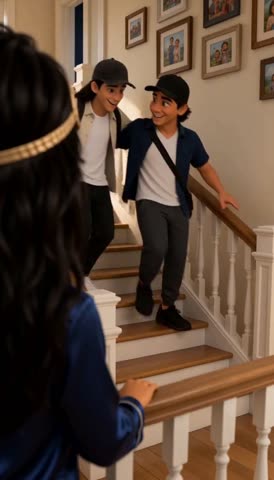
take2c v3 of The boys head out
Found by an AI agent in the video, not yet checked by Dana
ProblemLola looks level into the camera at 8.5 s and 9.5 s, not downward. The prompt asked her to look down the stairs at her sons.
The prompt line it doesn't match is “looking down at her sons with a warm smile”
How the AI agent found it
Evidence. Seen in the web clip frame at 8.5 s (274 x 480). Start and end are the shot's cut times found by scene detection. The quote is the prompt line the frame does not match.
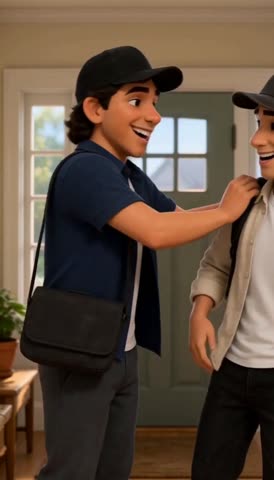
take2d v4 of The boys head out
Found by an AI agent in the video, not yet checked by Dana
ProblemLola holds a cream slipper in one hand as well as the toothbrush in the other. The prompt asked for the toothbrush only, with the slippers on her feet.
The prompt line it doesn't match is “holding a toothbrush”
How the AI agent found it
Evidence. Seen in the web clip frame at 7.5 s (274 x 480). Start and end are the shot's cut times found by scene detection. The quote is the prompt line the frame does not match.
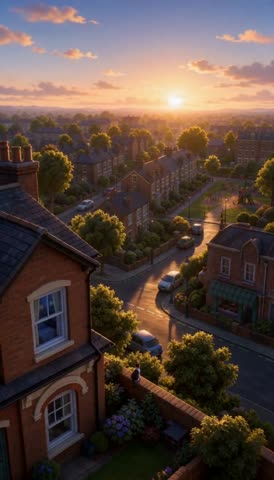
take5 v1 of Finishing work and heading to the gym
Process Log note2 Nov 04:26 Review
“Flags found: daylight in the work room window right after the dusk time-lapse; the racing-top stripes vanish when she raises her arms; the laptop never visibly shuts; the gym bag isn't on the counter, only at the exit; the clip's own sound peaks near 0 dB.”
Problem“daylight in the work room window right after the dusk time-lapse”
Problem“the racing-top stripes vanish when she raises her arms”
Problem“the laptop never visibly shuts”
Problem“the gym bag isn't on the counter, only at the exit”
Problem“the clip's own sound peaks near 0 dB”
How this note was matched to take5
The log's 2 Nov 04:17 entry gives this take's task id, which matches the take5 log, and 5.5 minutes matches its generation time.
An AI agent matched this note to the take and chose problem or worked. I haven't checked that.
Process Log note2 Nov 04:50 Rejected
ProblemRun 1's banana came out of the fridge half peeled.
How this note was matched to take5
Run 1 of Take 5. The next entries in the log name run 2 as take5b and run 3 as take5c, so run 1 is take5.
An AI agent matched this note to the take and chose problem or worked. I haven't checked that.
Found by an AI agent in the video, not yet checked by Dana
ProblemThe work room window shows bright daylight and green trees straight after the dusk time-lapse in shot 1.
The prompt line it doesn't match is “the sky turns from afternoon gold to dusky pink and purple”
How the AI agent found it
Evidence. Seen in the web clip frame at 3.5 s (274 x 480). Start and end are the shot's cut times found by scene detection. The quote is the prompt line the frame does not match.
Agrees with. Process Log label pl-02. The AI agent had read the Process Log before looking at the frames, so this is a confirmation, not an independent match.
ProblemThe banana is already half peeled in her hand while the fridge door is still open. Peeling was planned for the next shot.
The prompt line it doesn't match is “takes out one banana”
How the AI agent found it
Evidence. Seen in the web clip frame at 11.5 s (274 x 480). Start and end are the shot's cut times found by scene detection. The quote is the prompt line the frame does not match.
Agrees with. Process Log label pl-07. The AI agent had read the Process Log before looking at the frames, so this is a confirmation, not an independent match.
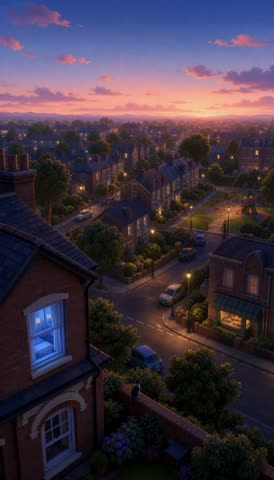
take5b v2 of Finishing work and heading to the gym
Process Log note2 Nov 05:01 Step
“Run 2: the whole banana is peeled at the flyer and the bag is on the counter, but the laptop is still there.”
Problem“but the laptop is still there”
How this note was matched to take5b
The log's 2 Nov 04:52 entry names run 2 as take5b and run 3 as take5c.
An AI agent matched this note to the take and chose problem or worked. I haven't checked that.
Process Log note2 Nov 05:01 Step
ProblemBoth show daylight in the kitchen windows even though "dusk" was in the prompt.
How this note was matched to take5b
The log's 2 Nov 04:52 entry names run 2 as take5b and run 3 as take5c.
An AI agent matched this note to the take and chose problem or worked. I haven't checked that.
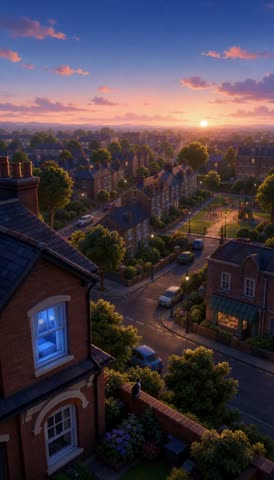
take5c v3 of Finishing work and heading to the gym
Process Log note2 Nov 05:01 Step
“Run 3: the desk is right (monitor switched off, no laptop), but she sips the shake rather than making it, the flyer is cropped, and she leaves without the shake.”
Problem“she sips the shake rather than making it”
Problem“the flyer is cropped”
Problem“she leaves without the shake”
How this note was matched to take5c
The log's 2 Nov 04:52 entry names run 2 as take5b and run 3 as take5c.
An AI agent matched this note to the take and chose problem or worked. I haven't checked that.
Process Log note2 Nov 05:01 Step
ProblemBoth show daylight in the kitchen windows even though "dusk" was in the prompt.
How this note was matched to take5c
The log's 2 Nov 04:52 entry names run 2 as take5b and run 3 as take5c.
An AI agent matched this note to the take and chose problem or worked. I haven't checked that.
Found by an AI agent in the video, not yet checked by Dana
ProblemAt 4.5 s and 5.5 s the work room window shows bright daylight. The prompt asked for a pink and purple dusk sky.
The prompt line it doesn't match is “pink-purple dusk sky in the window”
How the AI agent found it
Evidence. Seen in the web clip frame at 4.5 s (274 x 480). Start and end are the shot's cut times found by scene detection. The quote is the prompt line the frame does not match.
ProblemThe kitchen window on the right shows bright daylight and green plants. The prompt asked for dusk.
The prompt line it doesn't match is “the kitchen at dusk”
How the AI agent found it
Evidence. Seen in the web clip frame at 7.5 s (274 x 480). Start and end are the shot's cut times found by scene detection. The quote is the prompt line the frame does not match.
Agrees with. Process Log label pl-15. The AI agent had read the Process Log before looking at the frames, so this is a confirmation, not an independent match.
ProblemThe banana is already peeled open in her hand while the fridge door is still open. The prompt asked for a whole, unpeeled banana in this shot.
The prompt line it doesn't match is “takes out one whole, unpeeled yellow banana, still closed in its skin”
How the AI agent found it
Evidence. Seen in the web clip frame at 11.5 s (274 x 480). Start and end are the shot's cut times found by scene detection. The quote is the prompt line the frame does not match.
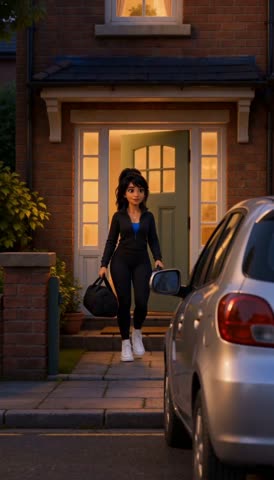
take6 v1 of Driving to the gym
Process Log note2 Nov 05:33 Step
“Neither shows the bag on the passenger seat (a small background detail [the video model] skipped).”
Problem“Neither shows the bag on the passenger seat”
How this note was matched to take6
Take 6 has two folders (take6 and take6b), and the sentence says neither run shows it, so it applies to both.
An AI agent matched this note to the take and chose problem or worked. I haven't checked that.
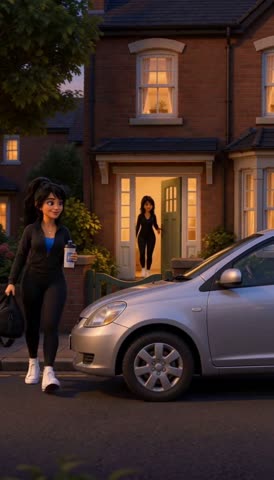
take6b v2 of Driving to the gym
Process Log note2 Nov 05:33 Step
“Neither shows the bag on the passenger seat (a small background detail [the video model] skipped).”
Problem“Neither shows the bag on the passenger seat”
How this note was matched to take6b
Take 6 has two folders (take6 and take6b), and the sentence says neither run shows it, so it applies to both.
An AI agent matched this note to the take and chose problem or worked. I haven't checked that.
Found by an AI agent in the video, not yet checked by Dana
ProblemA second dark-haired woman in black stands in the open front doorway while Lola walks down the path towards the car.
The prompt line it doesn't match is “Lola steps out”
How the AI agent found it
Evidence. Seen in the web clip frame at 0.5 s (274 x 480). Start and end are the shot's cut times found by scene detection. The quote is the prompt line the frame does not match.
The rule behind each failure type used here
An AI agent wrote each type's name. The rule under it is quoted from the Process Log.
- Wrong light in the windows wrong_window_light
- Rule from the Process Log. The window light follows the picture. Draw a dusk or night version of the room first.
- Wrong object condition or an extra person wrong_object_or_extra_person
- Rule from the Process Log. State each object's exact condition ("one whole, unpeeled banana"). For doorway wides, say "only one person in the shot".
- She faced the wrong way wrong_facing
- Rule from the Process Log. For every shot, name what is on the left and right of frame and which way she faces, matched to [Dana]'s reference clip (fridge on the left, window on the right, facing right).
- Wrong exit or hands too full wrong_exit_or_full_hands
- Rule from the Process Log. Name the door she leaves by. Check hands, outfit changes and hygiene (when she showered) before posting a plan.
Prompt change, output change
Pick a scene and two of its versions. Both clips play together, and the prompt change between them is shown word by word.
The two clips play muted and stay on the same second.
What changed in the prompt
From v1 to v2, 132 words added and 13 words taken out.
Added Taken out
How to run it again
The data files
- The page reads four files, takes.json, labels.json, failures.json and label-run.json. Every number on it is worked out from those files when the page renders, so a change to a file changes the page.
- takes.json holds the 25 take logs saved while I made episode 1 of The Life of Lola, with each prompt, length, generation time and cost. The frame for each shot is taken from the middle of its planned time, so a frame can show a neighbouring shot if the clip cut early or late.
- labels.json holds 24 labels that quote the Process Log and 8 labels an AI agent found in the video. An AI agent matched each Process Log note to its take, chose problem or worked, and proposed the failure types. I've added my own note to 1 of the Process Log labels.
- failures.json holds the 59 failure types an AI agent proposed. 4 of them are used by a problem label.
- The checks aren't stored. The page runs preflight() from the Lola Studio planner and the risk check's text patterns on each prompt in takes.json each time it renders.
The AI agent's labelling run, step by step
This is the run recorded in label-run.json on 19 Nov. The agent had read the Process Log first. It looked at 25 takes and 377 distinct frames, and checked 42 frames at full web size. To run it again, follow the same steps on takes.json, then I approve, edit or reject each label it proposes.
- Read each take's prompt and parsed shot list from takes.json.
- Found the real cut times in each web clip with scene detection, because the per-shot frames sit at the planned midpoints and some clips cut early or late.
- Looked at one frame per second from each web clip as contact sheets (240 px wide), and two frames per second for the two one-shot bedtime takes.
- Checked every candidate problem on single frames at the clip's full web size (274 x 480) before writing a label.
- Compared the bedroom, work room and Lola outfit reference pictures with the frames where a set or outfit question came up.
- Used only codes from failures.json. Where a visible difference had no fitting code, it was written down in label-run.json instead of being labelled.
The run proposed 9 labels. I rejected ag-03 on 20 Nov, so it isn't on this page. My reason was “The work room walls are meant to be navy. The reference picture is out of date.” The other 8 are waiting for me to approve, edit or reject them. It also wrote down 8 differences that no failure type covers, without labelling them. No problem matching a code was seen in the frames looked at, at 274 px or smaller. It does not mean the take has no problems.
Limits
- Costs are the app's list price per second multiplied by each take's seconds. They aren't invoices.
- Anything an AI agent added is marked as such, and I haven't checked it unless a label says it's checked. That includes its labels, every failure type name, which take a Process Log note belongs to, and the scene names with a dotted underline.
- 20 of the 22 problem labels are in two scenes, and 18 of the 25 takes have no problem label. A take with no label hasn't been labelled yet, which isn't the same as having no problems. So the comparison with the risk check shows which takes were labelled more than it shows what the check can do.
- One director, one episode and 25 takes is a small sample. The counts describe this episode only.
- The checks were run on the saved prompts after the takes were made. They test the checks, not the takes.
- F1 and E4 on the Lola Studio page measure the act 1 montage take, which isn't one of these 25 takes, so they aren't used here.
- Names of other studios and tools, and the other name the Process Log uses for me, are replaced with a bracketed description.
Related findings on the Lola Studio page
These come from the case study, not from the labels on this page.
- F5
My notes were about staging, not about her.
All 6 notes across 3 scenes were about the camera, the action, continuity or the location. These are my notes on the Lola Studio page, not the labels on this page. It tests H4 in E5.
Compare Waking upCompare The boys head outCompare Getting dressed
- F6
A full 15 second take cost $1.20 at the list price.
The take log adds up to 25 takes, 328 seconds and $26.24 at the list price. The case study reads this as “The cost per take is low enough to keep testing changes.”