Revamping My Website
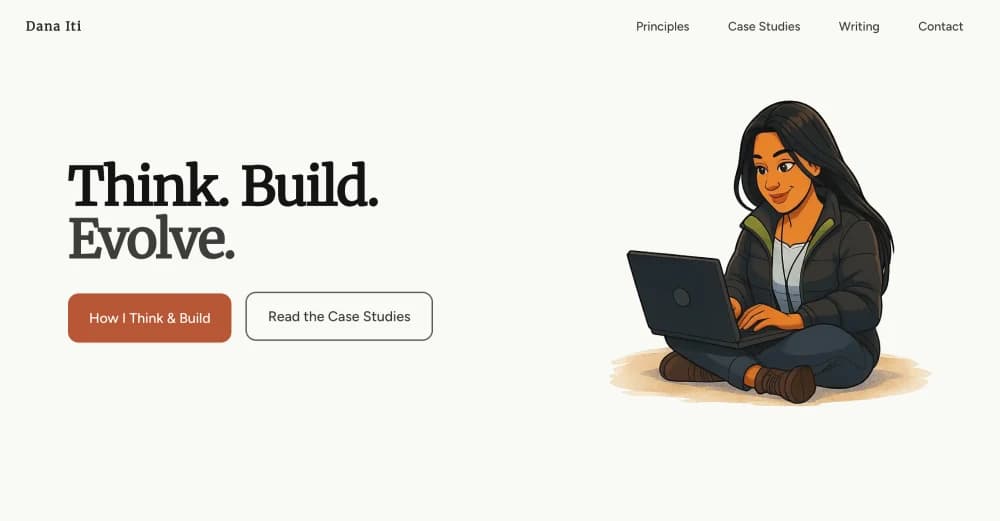
I redesigned my website in the browser.
Not because the old one was broken, but because it no longer reflected how I think about systems or the work I want to share.
This time, I approached it less like a portfolio and more like a system. Every colour, font size, and motion curve had to justify its existence. The goal wasn't to showcase everything I could do, it was to create something calm, editorial, and built to last.
What's on the Site
The site is structured around a few key sections:
- Principles - My approach to design, systems thinking, and building products
- Case Studies - Selected work and projects I've built
- Toolkit - The technologies and tools I use
- Writing - Long-form articles about design, engineering, and product work
- Contact - Ways to connect with me
Everything is built to load fast, read well, and work without JavaScript where possible.
What Changed
Philosophy
The old site leaned heavily into visual style. Bold gradients, layered elements, attention-grabbing motion. It looked impressive, but it also felt noisy. Like a designer screaming "look what I can do!" at everyone who visited.
This version strips that back. The approach prioritises structure over style, accessibility over decoration, and longevity over novelty. It's quieter, more deliberate, and easier to navigate.
I focused on branding throughout, creating a cohesive visual identity that feels distinctly mine. Every detail, from the typography choices to the spacing rhythm, contributes to a consistent brand presence.
I wanted the content to carry the weight, not the visual flourish.
Navigation
The navigation is fixed at the top, staying accessible as you scroll. It's minimal, just the essential links without any dropdown menus or hidden navigation patterns. Clear, direct, and always within reach.
Hero section
The hero opens with a deliberate animation that reveals my name and skills, but only on your first visit. I didn't want the standard "Hi, I'm [Name], I do [Thing]" hero. Because nothing says "unique personal brand" like doing exactly what every other portfolio site does.
Instead, the animation introduces who I am while showing how I approach problems. It's functional, purposeful, and sets the tone for the rest of the experience. People don't just see my work, they see how I think from the first moment they land on the site.
Typography and scale
I rebuilt the entire typographic system from scratch using a modular scale based on the golden ratio (1.618). Every heading, body text, and caption size is part of a consistent hierarchy.
- Headings: Scale from
3.052rem(h1) down to1rem(h6) - Body text:
1rembase with1.618remline height - Small text:
0.618remfor captions and metadata
The result is a rhythm that feels natural without requiring manual adjustments.
I also prevent orphans, those single words left hanging on the last line of a paragraph. It's a small detail, but it makes the text feel more polished and intentional. Yes, I spend time obsessing over single words sitting alone on a line. This is what passes for important work in typography.
Colour system
The colour palette stays intentionally warm. Layered ivory and parchment backgrounds create structure, while a clay/terracotta accent family handles interaction at different intensities. I skipped the usual success/warning/error set entirely, most surfaces never need them, and I’d rather introduce state colours deliberately if a component truly calls for it.
Everything else is typography, spacing, and layout.
Motion and interaction
Motion is functional, not decorative. Transitions are subtle, fast (150-300ms), and exist to guide attention or signal state changes.
Hover states, focus indicators, and loading states all use consistent timing and easing curves. No parallax, no page transitions, no unnecessary flourishes.
Accessibility
Accessibility wasn't an afterthought, it was baked into the foundation:
- Semantic HTML throughout
- ARIA labels where needed
- Keyboard navigation support
- Focus indicators on all interactive elements
- Sufficient colour contrast ratios
- Responsive typography that scales with viewport size
- Skip links for keyboard users to jump straight to content
I wanted the site to work well for everyone, regardless of how they access it.
Dark mode
I built a theme switcher that lets users see color mode based on their system. The preference is saved and respected across visits. It's not just an inverted colour scheme, both modes are designed intentionally to maintain contrast and readability.
Case studies
Each case study is presented with context, process, and outcomes. The layout focuses on the story of the work rather than just showcasing final designs. It's about demonstrating how I think and solve problems, not just what the end result looks like.
Toolkit
The toolkit section shows the technologies and tools I use, organised by category. It's straightforward, no skill bars or percentage ratings, just a clear picture of what's in my stack and why I use it. Because nothing builds credibility like claiming you're "87% proficient" in JavaScript.
Contact
The contact section is direct. No forms that might fail or get lost in spam filters. Just clear ways to connect, links that work, information that's current, and no friction between someone wanting to reach out and actually being able to do so.
Loading states
I built custom skeleton screens for every major section. While content loads, users see placeholder layouts that match the final structure. No generic spinners, no strange layout shifts, just a smooth transition from loading to loaded.
Performance
The site is built for speed. Static generation means most pages load instantly. Images are optimised and lazy-loaded where appropriate. CSS is scoped and minimal. JavaScript only loads where it's actually needed.
Every interaction feels immediate because the foundational architecture prioritises performance from the start.
Writing
The writing section houses long-form thinking about design, systems, engineering, and product work.
I recreated the blog cards from scratch, designing them to feel clean and scannable. Each card shows the post title, summary, date, and tags without overwhelming the layout. The cards respond to hover and focus states with subtle transitions, making it clear what's interactive without being distracting.
Posts are categorised, tagged, and organised chronologically. The reading experience prioritises clarity and readability. Wide margins, comfortable line length, and generous spacing between sections.
Each post includes a reading progress indicator that shows how far through the article you are. Code blocks have syntax highlighting and a copy button for easy use.
Related posts appear at the end to keep you exploring.
I also added series support, posts can declare series, seriesPart, seriesBlurb, and seriesNextTeaser in their frontmatter, the MDX pipeline pulls that data, and the reading view assembles previous/next links plus a dedicated jump list so multi-part stories stay connected.
No sidebars, no distractions, just the writing.
Tech Stack
Built with Next.js 15 using the App Router, TypeScript, Tailwind CSS, and MDX for blog content.
I chose MDX over a traditional CMS because I wanted full control over the content without relying on external services. Supabase goes offline if you don't push anything to it for a while, and I didn't want my blog posts disappearing because of inactivity. Nothing says "modern cloud infrastructure" like your content vanishing because you didn't write enough.
The entire site is statically generated at build time, which means it's fast, SEO-friendly, and doesn't rely on client-side rendering for core content.
What This Represents
This site is a reflection of how I think about product design now.
It's about deciding what can stand on its own. Building systems that scale, accessibility that's baked in from the start, and design that prioritises longevity over trends.
It's a playground for testing ideas, documenting my thinking, and sharing what I learn along the way.
And it's built to evolve. As my thinking changes, the site will too.